It is currently Tue May 21, 2013 2:38 pm

All times are UTC


Post new topic Reply to topic  [ 10 posts ] 
Author Message
PostPosted: Sun Jan 30, 2011 3:50 am 
Offline
Snes9x Yellow Belt
User avatar

Joined: Sun Dec 30, 2007 12:14 am
Posts: 64
Location: Japan, Nagoya
TODO: Use S9xGetSampleCount() rather than calcurate sample length in port-specific code.

====

http://pastebin.com/KNvgV2qP

windows:
  • fixed AVI image size, now it should resize Hi-Res image properly.
  • added GUI.AVIHiRes option, which allows us recording Hi-Res image without down-sampling. (it cannot be changed from GUI at the moment, needs addition in menu/dialog)
  • modified ReInitSound, to do nothing during AVI recording (fix "Reset during AVI recording" situation)
Note: my AVI recording code doesn't use Convert16To24. I guess it can be simplified like Convert16To32 from now, if needed.

_________________
gocha - TASvideos forum


Last edited by gocha on Sun Feb 13, 2011 6:35 am, edited 1 time in total.

Top
 Profile  
 
 Post subject:
PostPosted: Sun Jan 30, 2011 7:04 am 
Offline
Snes9x Yellow Belt
User avatar

Joined: Sun Dec 30, 2007 12:14 am
Posts: 64
Location: Japan, Nagoya
http://pastebin.com/29Zd2raP

windows: improved AVI sound sync (solution for the 32kHz desync issue)

Ideally, available sound sample length should be reported by core, I think. Oh well.

_________________
gocha - TASvideos forum


Top
 Profile  
 
 Post subject:
PostPosted: Sun Jan 30, 2011 10:17 pm 
Offline
Snes9x Purple belt
User avatar

Joined: Thu Nov 08, 2007 7:59 pm
Posts: 909
Location: /dev/null
Mirrored on my website. Thanks!

_________________
Snes9x FAQs | Forum Rules
What operating system are you using? 32 or 64bit? Version of Snes9x? Is the text at the bottom of the window white when you load the game?
These suggestions are usually the solution to your issue!


Top
 Profile  
 
PostPosted: Mon Jan 31, 2011 4:16 am 
Offline
Snes9x Orange Belt

Joined: Sat Oct 17, 2009 4:18 am
Posts: 210
gocha wrote:
http://pastebin.com/KNvgV2qP

windows: [list][*] fixed AVI image size, now it should resize Hi-Res image properly.


Nice :D

_________________
Lisa: "I hope you all know you're sponsoring a murderous pirate!"
Sponsor: "A pirate!!? Well, that's hardly the image we need for Long John Silvers!"


Top
 Profile  
 
 Post subject:
PostPosted: Mon Jan 31, 2011 4:39 pm 
Offline
Official Win32 Porter/Dev
User avatar

Joined: Thu Aug 30, 2007 10:15 pm
Posts: 450
Just to clarifiy: you want to ensure a specific 1x/2x output size, while currently the snes output at the start of the recording decides on the avi size?

I had a quick look and it seems you missed the 512x448 hires/interlaced output mode.

Quote:
Ideally, available sound sample length should be reported by core, I think. Oh well.
You mean the byte size of one sample? Available samples are already available through S9xGetSampleCount().


Top
 Profile  
 
 Post subject:
PostPosted: Tue Feb 01, 2011 10:46 pm 
Offline
Snes9x Yellow Belt
User avatar

Joined: Sun Dec 30, 2007 12:14 am
Posts: 64
Location: Japan, Nagoya
OV2 wrote:
Just to clarifiy: you want to ensure a specific 1x/2x output size, while currently the snes output at the start of the recording decides on the avi size?

I had a quick look and it seems you missed the 512x448 hires/interlaced output mode.

You're right. Yeah, I missed interlaced output. What game does use hires/interlaced mode?

OV2 wrote:
Available samples are already available through S9xGetSampleCount().

Probably, that's exactly I wanted. However, it doesn't work well in DoAVIVideoFrame(), probably because SoundDevice is closed or something like that.

_________________
gocha - TASvideos forum


Top
 Profile  
 
 Post subject:
PostPosted: Wed Feb 02, 2011 12:53 am 
Offline
Snes9x Orange Belt

Joined: Sat Oct 17, 2009 4:18 am
Posts: 210
gocha wrote:
OV2 wrote:
You're right. Yeah, I missed interlaced output. What game does use hires/interlaced mode?


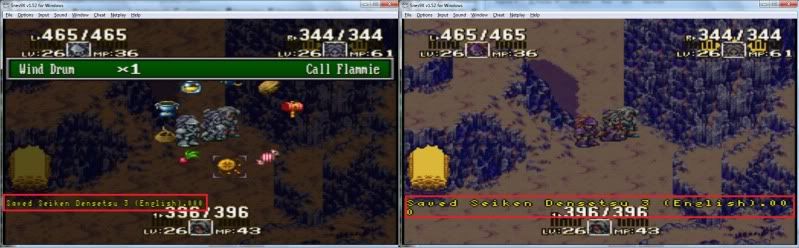
Seiken Densetsu 3 uses it every time text shows up on the screen; if you make a savestate when text is shown, the name of the save will look squished.

Here's a comparison:

Image

_________________
Lisa: "I hope you all know you're sponsoring a murderous pirate!"
Sponsor: "A pirate!!? Well, that's hardly the image we need for Long John Silvers!"


Top
 Profile  
 
 Post subject:
PostPosted: Wed Feb 02, 2011 2:12 am 
Offline
Official Win32 Porter/Dev
User avatar

Joined: Thu Aug 30, 2007 10:15 pm
Posts: 450
SD3 uses plain hires.

Examples for hires+interlaced are "RPM Racing" (the whole game), "Olivia's Mystery" (Title Screen) or "Bishoujo Wrestler Retsuden - Blizzard Yuki Rannyuu!!" (Company Logo).


Top
 Profile  
 
 Post subject:
PostPosted: Wed Feb 02, 2011 3:04 am 
Offline
Hero of Hyrule | Official Port Recruiter

Joined: Mon May 24, 2004 5:06 pm
Posts: 2490
Location: 255.255.255.255
Uhm... doesn't parts of "Treasure of the Rudras", "Super Play Action Football", "Secret of Mana", and the title screen of "Donkey Kong Country" use hi-res and/or interlace?

_________________
Image

Unofficial Test Monkey For:
* Snes9X GX (Wii)
* Snes9X EX (Android)
* Snes9X 64-bits

ZSNES|Ben Heck|NSRT|Bob Smiley


Top
 Profile  
 
 Post subject:
PostPosted: Fri Feb 04, 2011 3:07 pm 
Offline
Snes9x Yellow Belt
User avatar

Joined: Sun Dec 30, 2007 12:14 am
Posts: 64
Location: Japan, Nagoya
Thank you OV2. I put additional patch for interlace.
http://pastebin.com/MKYz0eN8

Edit: oops, moved Interp().
http://pastebin.com/Pc0Htjsn

I didn't test normal/interlace game. I hope it will work well.

<del>Known Issues: BlendHiRes doesn't work for every frame with interlaced screen.</del>

_________________
gocha - TASvideos forum


Top
 Profile  
 
Display posts from previous:  Sort by  
Post new topic Reply to topic  [ 10 posts ] 

All times are UTC


Who is online

Users browsing this forum: No registered users and 1 guest


You cannot post new topics in this forum
You cannot reply to topics in this forum
You cannot edit your posts in this forum
You cannot delete your posts in this forum
You cannot post attachments in this forum

Search for:
Jump to:  
Powered by phpBB® Forum Software © phpBB Group